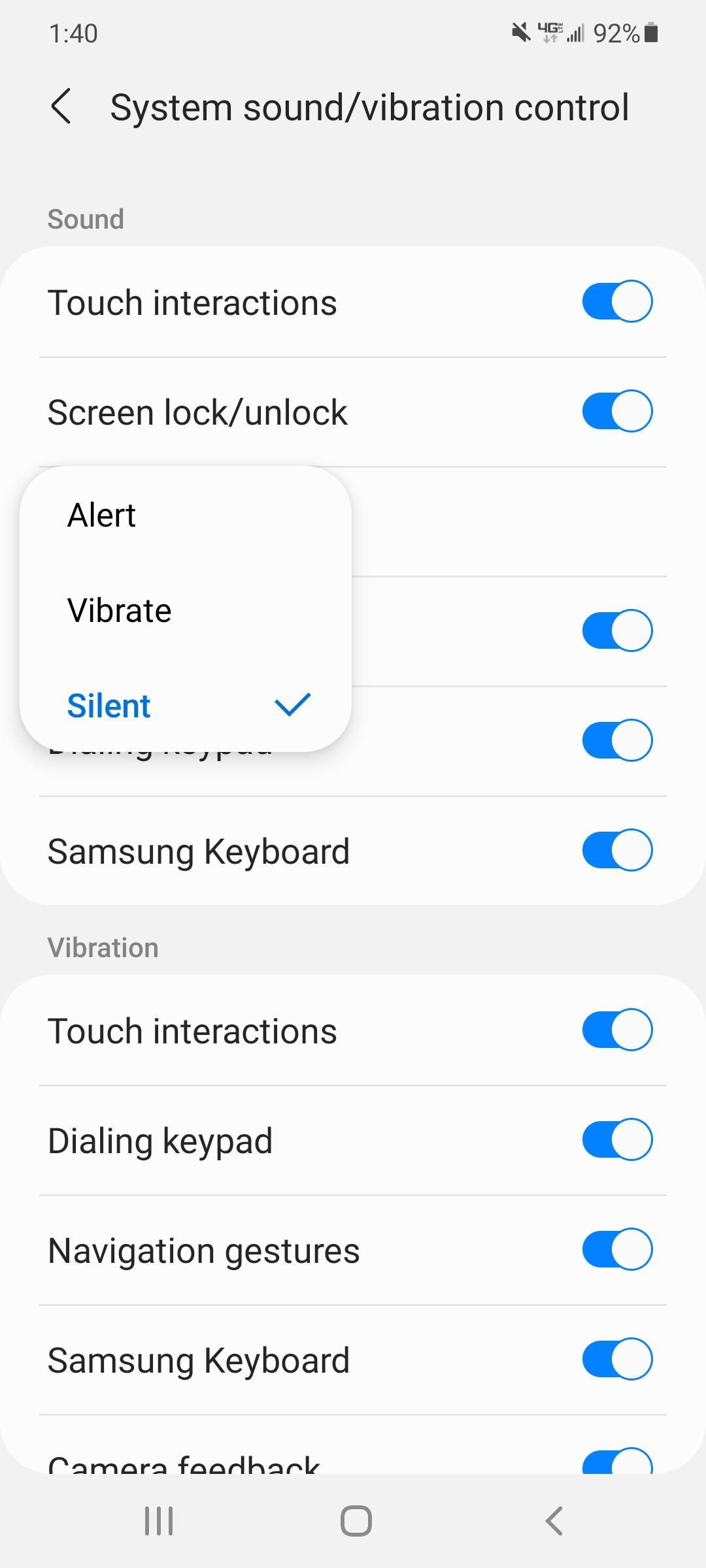
Someone posted something about changing the EAS ringtone and I went looking for mine on my Samsung Galaxy S20. You can't change the sound but you can make it silent - which I've never done.
That must be what the Verizon update changed on Saturday.
The "Emergency Tone" entry is right under that pop-up list shown.
I have an S20 as well. I've looked through all the settings and I have found nothing to set the EAS to silent. Can you help a fren out? I want to check.
The Emergency Tone option was also not showing up for me either.
I have a Samsung S10 and the option ended up being in the messages app. Open up your messages app --> click on the 3 dots ( top right corner ) --> settings --> Emergency Alert settings --> Emergency settings and it should appear now
I have a Galaxy S20 Ultra and "Emergency Alert Settings" does not appear in the messenger settings. I've looked all through the messenger settings based on another comment on this post. The only related option is "Emergency alert history" and I have "No previous alerts."
my emergency alert menu was completely removed LG V40
edit: originally I could find the settings and Presidential alerts by typing President or emergency alerts in the search box.
now only emergency alerts will pop up with that specific search. Presidential no longer comes up when searched. you can only find that menu by touching menu options in the top left corner inside the e. alerts menu. which wil. get you to the President alerts. the menu is hidden but that option is permanently set to on
Wrong section you're looking at. I assume you have a Samsung phone from your screenshot there. You need to open up your Messages app (the pre-installed Samsung one) and then open up the settings (3 dots in upper right). You will see the proper settings there.
I checked mine. In Notifications there is the ability to toggle Emergency Alerts on or off, but in Sounds I see no distinct category for Emergency Alerts. I think it falls under the Text Tone category.


Good find. We should all check.
Can confirm: Mine is set to silent.
However, according to https://www.androidcentral.com/amber-alerts-and-android-what-you-need-know#:~:text=Go%20to%20the%20Messaging%20app's,vibrate%20when%20you%20receive%20one. that shouldn't have anything to do with Presidential alerts, which are always on.
Yes, of course. I totally trust that now. I'll turn mine back to silent.
Why did I ever doubt Android Central?
Android Central was built around exploiting the architecture though.
However, that WAS posted in September of 2020, so yeah.
I don't REALLY know what these emergency alerts are for. Amber Alerts still get through. I'm pretty sure a bad weather warning came through once too.
CAN CONFIRM, MINE WAS TOO
Mine was set to silent too, wtf. Mfers....
Also on Android, mine was too. Good find!
Confirmed. I just changed mine. Thank you! I spent an hour going through most of the settings to shut off the updates.
Great catch!
Holy shit, mine was as well....good fuckin fins OP
Someone posted something about changing the EAS ringtone and I went looking for mine on my Samsung Galaxy S20. You can't change the sound but you can make it silent - which I've never done.
That must be what the Verizon update changed on Saturday.
The "Emergency Tone" entry is right under that pop-up list shown.
I have an S20 as well. I've looked through all the settings and I have found nothing to set the EAS to silent. Can you help a fren out? I want to check.
Settings->Sounds and Vibrations->System sound/vibration control.
Third item down: Emergency tone
Thanks for the instructions. The Emergency Tone option does not appear for me.
I "updated" my phone earlier this evening and am very curious if this particular setting was changed.
The Emergency Tone option was also not showing up for me either.
I have a Samsung S10 and the option ended up being in the messages app. Open up your messages app --> click on the 3 dots ( top right corner ) --> settings --> Emergency Alert settings --> Emergency settings and it should appear now
Thanks again for the help.
I have a Galaxy S20 Ultra and "Emergency Alert Settings" does not appear in the messenger settings. I've looked all through the messenger settings based on another comment on this post. The only related option is "Emergency alert history" and I have "No previous alerts."
I turned my on and I need to update. Im going to update and see if it changes. Ill check back in, in a few mins.
Edit: it didn't change my setting but good catch. I would of missed history!
'have', sorry, I can't help it!
Same
my emergency alert menu was completely removed LG V40
edit: originally I could find the settings and Presidential alerts by typing President or emergency alerts in the search box.
now only emergency alerts will pop up with that specific search. Presidential no longer comes up when searched. you can only find that menu by touching menu options in the top left corner inside the e. alerts menu. which wil. get you to the President alerts. the menu is hidden but that option is permanently set to on
Mine was on silent too
Mine is set to how my ringer is so of my phone is on silent the alerts are silent but vibrates
Mine was also set to silent. Thanks for the heads up!
Wrong section you're looking at. I assume you have a Samsung phone from your screenshot there. You need to open up your Messages app (the pre-installed Samsung one) and then open up the settings (3 dots in upper right). You will see the proper settings there.
Messages isn't a system setting. I have that app disabled.
Someone confirm or deny im on ios
Look through your system settings for sound. There should be a setting in there for the Emergency Tone or Sound.
I checked mine. In Notifications there is the ability to toggle Emergency Alerts on or off, but in Sounds I see no distinct category for Emergency Alerts. I think it falls under the Text Tone category.
Check under notifications as well. I checked there and one was set to silent as well.
I saw something flash earlier that my Google play was updating..so maybe the pushed it out via that?